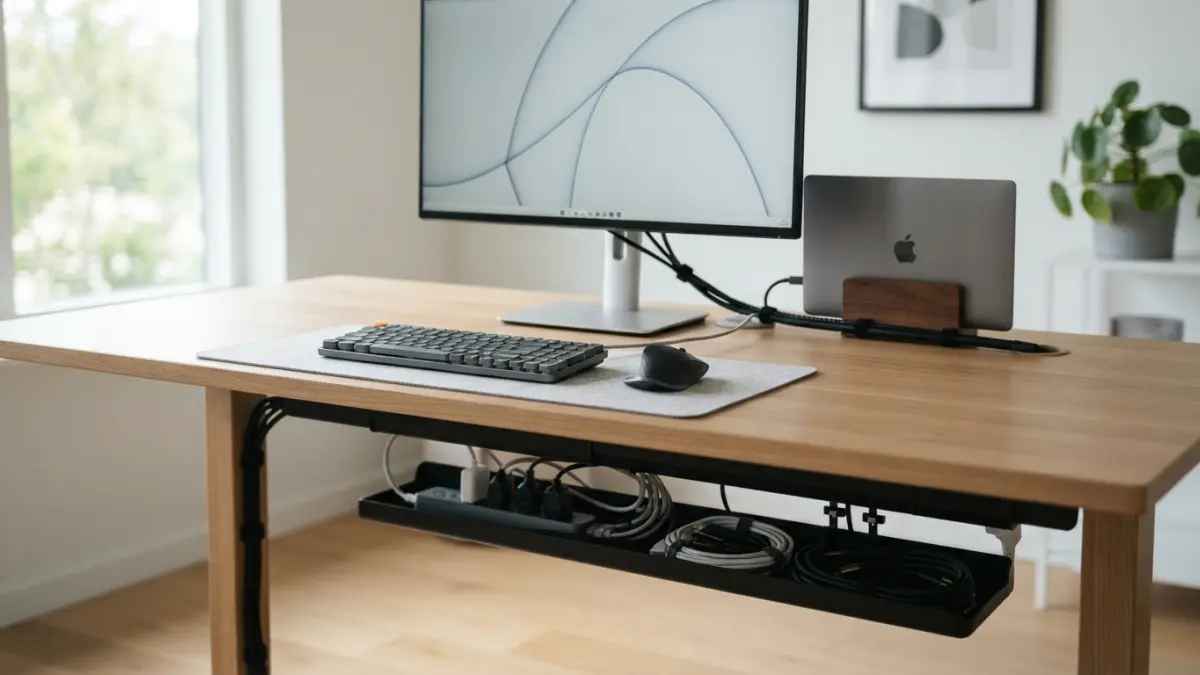
Cable Management Hacks: 7 Easy Tips for a Tidy Desk
If your desk looks like a plate of spaghetti every time you sit down to work, you’re not alone. Between a laptop charger, a monitor cable, a mouse dongle, and maybe a webcam or desk lamp, remote work setups tend to collect wires fast. The good news is that a few simple cable management hacks can turn that tangled mess into a clean, minimalist workspace in an afternoon, without spending a fortune on fancy gear.
A tidy desk setup isn’t just about looks. Loose cords create tripping hazards, make cleaning harder, and can even shorten the lifespan of your equipment if cables get bent or crushed under furniture. Groups like the National Fire Protection Association point out that damaged or overloaded cords are a real safety concern, not just an eyesore. On top of that, a clutter-free space has a way of clearing your head too. When your desk looks calm, it’s easier to focus, and a minimalist workspace tends to feel less overwhelming by the end of a long video call day. If you want to dig deeper, our guide on Best Budget Desk Setups for Remote Workers covers this in more detail.
7 Easy Cable Management Hacks for a Clean, Minimalist Desk
You don’t need to buy an entirely new desk or hire a professional organizer to fix this. The following seven ideas are affordable, quick to set up, and work whether you have a tiny corner desk or a full home office. Pick the ones that fit your space best, and feel free to mix a few together for the best results.
1. Attach Cable Clips Under Your Desk
Cable clips are small plastic or adhesive holders that stick to the underside of your desk and keep cords from dangling or sliding onto the floor. They’re cheap, they take seconds to install, and they instantly stop your charger or monitor cable from disappearing behind furniture every time you move your chair. Stick a row of clips along the back edge of your desk, then thread each cable through so it stays in a fixed path. This one small step is often the fastest way to see an immediate difference, and it’s usually the first fix people mention when swapping cable management hacks with coworkers.
2. Bundle Loose Cords with Ties or Sleeves
Once your cables are clipped in place, the next step is grouping them together so you don’t have five separate wires running side by side. Velcro ties are reusable and gentle on cords, unlike plastic zip ties that can pinch wires if pulled too tight. For a cleaner look, slide a fabric or neoprene cable sleeve over a bundle of cords running from your desk to the wall outlet. This turns four or five loose wires into one neat tube, which instantly makes cord organization look intentional rather than accidental.
3. Hide Your Power Strip in a Cable Box
Power strips are the messiest part of most desk setups, mainly because everything eventually plugs into them. A simple cable box, which is basically a vented container that hides your power strip and the extra cord length, solves this problem in one move. Slide the power strip inside, tuck any excess cable behind it, and close the lid. All you see on the outside is a plain box instead of a snake pit of plugs and adapters, and your desk instantly looks more like a showroom setup than a work-in-progress. This connects closely with another common issue — see Small Home Office Ideas for Remote Workers in Studio Apartments for more on that.
4. Label Every Cord at Both Ends
This hack sounds small, but it saves real time later. Use a label maker, colored tape, or even sticky notes to mark which cord belongs to which device, ideally near both the plug and the device end. When something stops working or you need to unplug just one item to troubleshoot, you won’t waste ten minutes tracing a cord back through a bundle. Labeling is especially useful if you work from a shared space or move your setup often, since it takes the guesswork out of reconnecting everything correctly.
5. Go Wireless Wherever It Makes Sense
Sometimes the best cable management hack is simply having fewer cables to manage. A wireless mouse, keyboard, or headset removes several cords from your desk without any extra hardware at all. Wireless charging pads can also handle your phone or earbuds case, cutting out yet another charger from the mix. This won’t eliminate every wire, since your monitor and laptop charger usually still need a physical connection, but reducing the total cord count makes every other hack on this list easier to manage.
6. Mount a Cable Tray Under the Desk Surface
A cable tray is a small basket or shelf that screws or clamps onto the underside of your desk, giving power strips, chargers, and extra cord length a dedicated spot that’s completely out of sight. This is a step up from cable clips because it holds bulkier items, not just thin wires. Many trays are adjustable, so you can slide them along the desk frame to sit exactly where your outlets are. It’s a slightly bigger project than the other hacks here, but it delivers one of the cleanest results for anyone serious about a fully minimalist workspace.
7. Create a Small Charging Station
Phones, tablets, smartwatches, and wireless earbuds all need charging, and without a plan, their cables end up scattered across your desk. A simple charging station, whether it’s a multi-port USB hub, a small tray with built-in charging pads, or just a designated corner with one power strip, keeps all of that in one place. This keeps your main desk surface reserved for work, while personal devices charge quietly off to the side. It’s a small habit change, but it pairs well with every other cable management hack on this list. You might also find our article on Lighting Tips for Video Calls That Actually Work helpful here.
Choosing the Right Cable Management Tools
Not every hack works for every desk, so it helps to know which tool suits which problem before you buy anything. The table below breaks down the most common options by cost, effort, and what they’re best suited for, so you can decide where to start based on your own setup and budget.
| Tool | Best For | Typical Cost | Setup Effort |
|---|---|---|---|
| Cable clips | Keeping loose cords off the floor | Low | Minimal |
| Velcro ties / sleeves | Bundling multiple cords together | Low | Minimal |
| Cable box | Hiding power strips and excess cord | Moderate | Low |
| Cable tray | Storing bulkier items under the desk | Moderate | Moderate |
| Charging station | Centralizing personal device charging | Moderate to High | Low |
If you’re working with a tight budget, start with cable clips and Velcro ties since they solve most of the visible clutter for very little money. Once those are in place, decide whether a cable box or tray fits your desk shape better; a box works well for desks against a wall, while a tray suits desks with open space underneath. According to general guidance from the OSHA computer workstation resources, keeping cords away from foot space is also a basic safety practice, not just a style choice, so treat that part of your setup as a priority rather than an afterthought.
Cable management isn’t a one-time project, even with the best gear. Cords get added and removed as you switch devices, so it’s worth doing a quick five-minute check every month or so to re-clip anything that’s come loose and tuck away any new wires. If you want to go deeper into the topic, the Wikipedia overview of cable management covers different industry approaches, some of which translate surprisingly well to a home desk. Treat your setup as something you maintain occasionally, not something you fix once and forget, and it will stay tidy far longer.
None of these seven ideas require special skills or a big budget, which is exactly why they work for almost any home office. Start with one or two hacks, see how much cleaner your desk feels, and add more as you go. A calmer, cord-free desk setup won’t fix every distraction of remote work, but it does remove one small source of daily friction, and that’s worth the hour it takes to set up. For a related walkthrough, check out Ergonomic Home Office Essentials Under 0.
Frequently Asked Questions
What is the cheapest way to start with cable management hacks?
Adhesive cable clips and Velcro ties are the most affordable starting point. Both cost very little, install in minutes, and immediately reduce visible clutter without any tools or drilling.
How do I manage cables on a standing desk that moves up and down?
Use a flexible cable sleeve or a spiral wrap that can stretch, along with a cable chain or tray designed for adjustable desks. This keeps cords from pulling tight or snapping when the desk height changes.
Are wireless devices worth it just for cable management?
They can be, especially for a mouse, keyboard, or headset, since removing even two or three cords makes a noticeable difference. Just weigh the cost against how much clutter those specific items are actually causing.
How often should I redo my cable management setup?
A quick check every month or two is usually enough. Most setups only need small adjustments, like re-clipping a cord or tucking in a new charger, rather than a full redo.
Can poor cord organization actually be a safety issue?
Yes. Loose cords can be a tripping hazard, and damaged or pinched cables can pose an electrical risk. Basic wire management, like keeping cords off walkways and away from chair wheels, helps prevent both problems.