Standing Desk vs Regular Desk: Which Is Best in 2026?
A standing desk sounds like the perfect fix for a stiff back and a sleepy afternoon. But does it really beat a regular desk? The question matters more than ever for people facing long remote workdays, because the kitchen table or spare-room desk is now the place where you spend most of your waking hours. Furniture companies promise big health gains, while skeptics say a chair is just fine. The truth sits somewhere in the middle. In this guide, we compare both setups in plain terms, look at comfort, cost, and habits, and help you decide what fits your home office in 2026.
Standing Desk vs Regular Desk: The Short Answer
Neither desk wins on its own. The best setup is the one that lets you change position often, so your body does not stay locked in one pose for hours. A regular desk is cheaper, stable, and familiar. A height-adjustable model gives you choices, but it only helps if you actually use them. Many people buy one, stand for a week, and then go back to sitting all day. Think of the desk as a tool, not a cure. The table below shows how the two options compare on the points that matter most for home workers. If you want to dig deeper, our guide on Best Budget Desk Setups for Remote Workers covers this in more detail.
| Factor | Standing desk | Regular desk |
|---|---|---|
| Movement | Easy to switch between sitting and standing | Mostly sitting unless you add breaks |
| Cost | Usually higher | Usually lower |
| Setup effort | Needs space and cable planning | Simple |
| Stability | Varies by model, especially at full height | Generally solid |
| Best for | People who want flexible posture | People on a tight budget or with little space |
Sitting vs Standing Health: What We Actually Know
When people talk about sitting vs standing health, they often pick a side too fast. Long stretches of sitting are linked to health concerns, and public health groups encourage people to move more during the day. Standing is not magic, though. Standing still for hours can tire your legs and feet, and it is not the same as exercise. The real goal is variety. Short walks, stretches, and position changes all count. If you want a solid overview of workstation setup, the OSHA computer workstations guide explains how posture, screen height, and seating work together. Its main message is simple: no single position is ideal for everyone, all day.
Back Pain Desk Work: Does a Standing Desk Help?
Many people try a new desk because of back pain desk work can cause after a few hours. Some find relief when they stand for part of the day, since changing position takes pressure off the lower back. Others feel worse, especially if they lock their knees or lean on one hip. Results differ from person to person, so avoid promises that a desk will fix pain. If your discomfort is sharp, lasts for days, or spreads into your legs, talk with a doctor or physical therapist instead of shopping for furniture. For mild, everyday stiffness, the winning move is usually a mix of good posture, a supportive chair, and regular movement.
Build a Sit Stand Schedule You Can Keep
A sit stand schedule turns a good desk into a good habit. Without a plan, most people forget to switch. Start small. Stand for a short block, then sit again before your legs get tired. Add time slowly over a few weeks. There is no magic ratio that works for everyone, so listen to your body and adjust. Here are a few easy ways to make the routine stick: This connects closely with another common issue — see Small Home Office: 7 Best Desk Ideas to Save Space for more on that.
- Stand during phone calls or video meetings.
- Switch position each time you finish a task.
- Set a gentle timer or calendar reminder.
- Take a short walk after lunch instead of going straight back to your chair.
Is a Desk Converter Enough?
A desk converter sits on top of your current desk and lifts your monitor and keyboard to standing height. It can be a smart middle path if you like your existing desk or rent your home. Converters cost less than a full height-adjustable desk and are easy to remove. They do have trade-offs. They take up a lot of surface space, and the keyboard tray can feel cramped. Some wobble when you type. Before buying one, measure your desk depth and check that your monitor can sit at eye level when raised. If your screen ends up too high or too low, you may trade one neck problem for another.
Add an Anti Fatigue Mat for Comfort
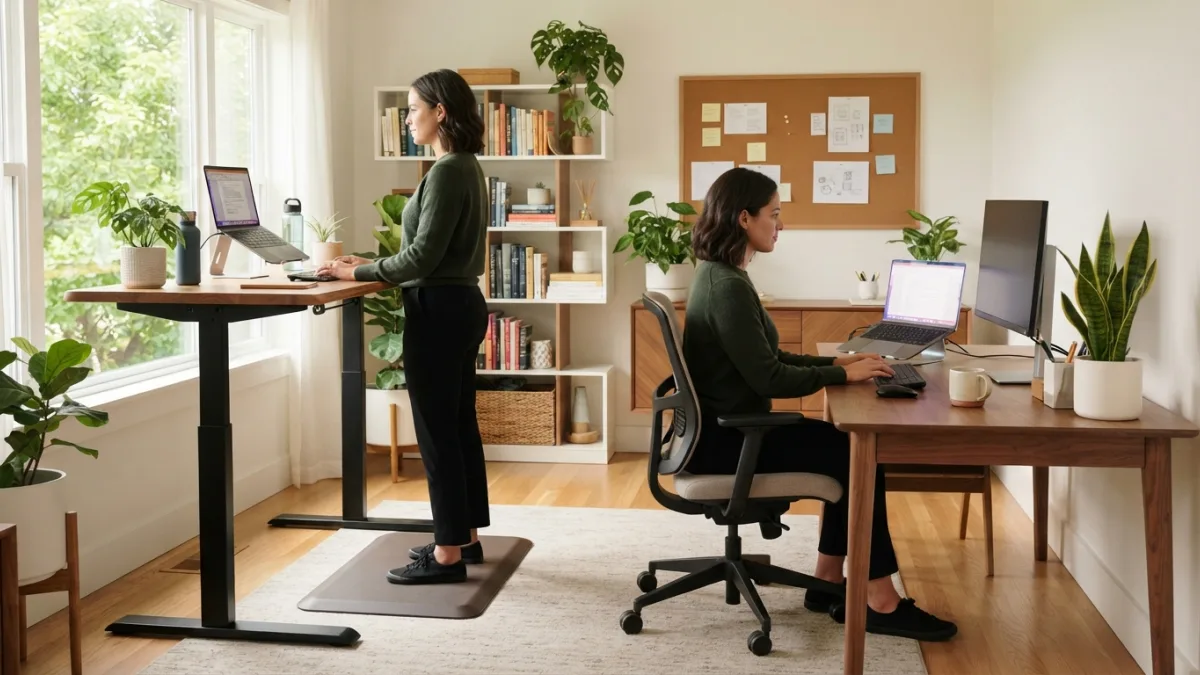
If you plan to stand, an anti fatigue mat can make the time far more comfortable. Hard floors tire the feet and legs quickly, and thin slippers rarely help. A cushioned mat gives you a softer surface and encourages small shifts in weight. Pick one that is thick enough to feel supportive but firm enough that you do not sink or trip on the edge. Comfortable shoes work well too. Keep in mind that a mat will not replace movement. It simply makes standing more bearable, so you can use your standing blocks without feeling worn out by mid-afternoon.
Setting a Home Office Desk Budget
Your home office desk budget should match how you really work, not how you wish you worked. A basic regular desk costs the least and may be all you need if you already take breaks and walk often. A height-adjustable frame costs more, and prices rise with motors, memory presets, and larger tabletops. Converters sit in the middle. Before you buy, consider the warranty, weight limit, and how loud the motor is. Also check whether your employer offers a home office allowance. Spending a little extra on a chair or monitor arm can sometimes help your comfort more than a pricier desk. You might also find our article on Cable Management Hacks: 7 Easy Tips for a Tidy Desk helpful here.
Desk Ergonomics Tips for Any Setup
Good desk ergonomics tips apply whether you sit, stand, or switch. Posture matters more than the label on the furniture. The CDC’s NIOSH program offers workplace health resources, including guidance on ergonomics. These basics are a solid place to start:
- Place your screen so the top sits at or just below eye level.
- Keep your elbows near your sides, bent at a comfortable angle.
- Rest your feet flat on the floor or on a footrest when sitting.
- Keep your wrists straight while typing.
- Look away from the screen regularly to rest your eyes.
Who Should Choose a Standing Desk?
A standing desk suits people who get restless in a chair, who like to move between tasks, or who share a workspace with different users. It also helps if you take many calls. A regular desk is a better choice if your space is tiny, your budget is tight, or you already build movement into your day. Some tasks, such as detailed design work or long writing sessions, may feel easier when seated. If you are still unsure, you can test the idea first. Try putting your laptop on a high counter for a few days, and see whether standing feels natural. For background on the concept, Wikipedia’s standing desk entry gives a useful overview.
The Verdict for Long Remote Workdays
For long remote workdays, flexibility beats any single position. A height-adjustable desk or converter gives you more options, but a regular desk can work well if you pair it with frequent breaks and a good chair. The best choice is the one you will use every day without resentment. Start with what you can afford, set up your screen and chair properly, and move often. If standing feels good, build on it. If it does not, you have lost little. Your body will tell you what works, and that feedback is worth more than any marketing claim. For a related walkthrough, check out Space Saving Desks: 10 Best Picks for Tiny Offices.
FAQ: Standing Desk vs Regular Desk
Is a standing desk better than a regular desk?
Not always. A standing desk gives you more posture choices, which can help if you use them. A regular desk works fine when you take regular breaks and sit with good posture.
How long should I stand during the workday?
There is no perfect number. Start with short periods, build up slowly, and switch back to sitting when you feel tired or sore.
Can a standing desk fix back pain?
It may ease stiffness for some people, but it is not a cure. Persistent or severe pain needs advice from a medical professional.
Is a desk converter a good alternative?
Yes, for many people. It costs less and fits on an existing desk, but check the size, stability, and screen height before you buy.
Do I need an anti fatigue mat?
You do not need one, but it can make standing more comfortable, especially on hard floors. Good shoes and regular movement help too.