Hidden Cloffice: 7 Simple Steps to a Perfect Home Office
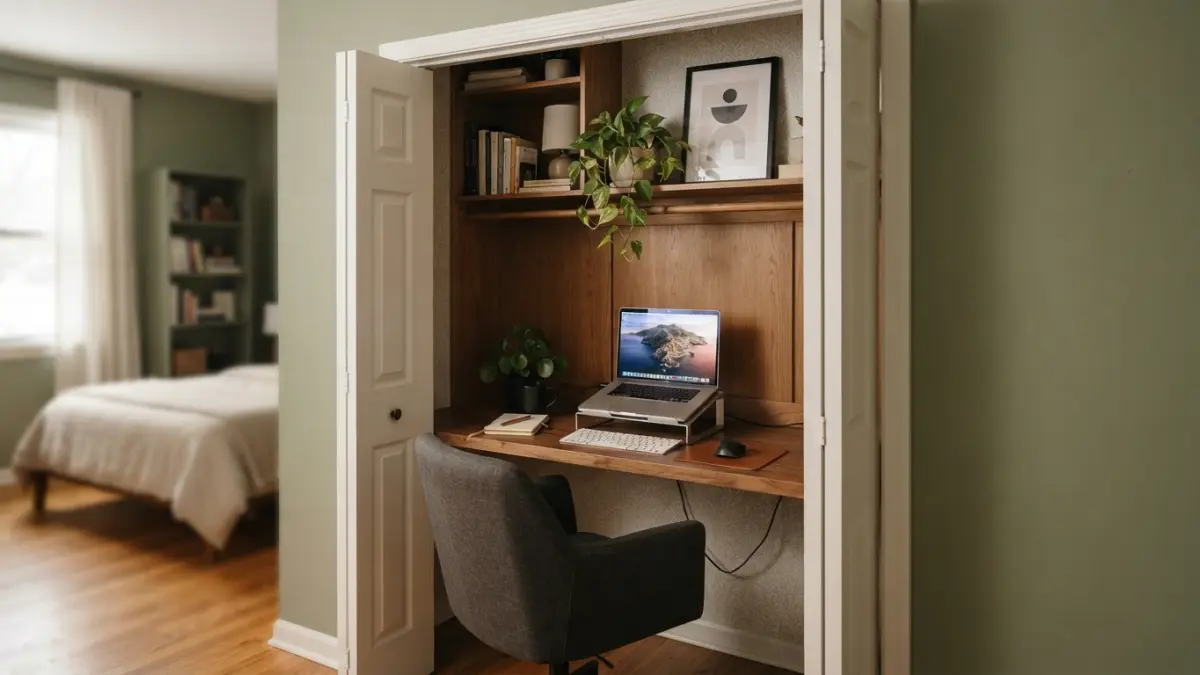
If you have ever tried to take a video call at the kitchen table while someone microwaves leftovers in the background, you already understand the appeal of a hidden cloffice. A cloffice, short for “closet office,” turns an underused closet into a compact, closed-door workspace that disappears the moment your workday ends. It is one of the smartest small space home office solutions for anyone juggling remote work and limited square footage.
Remote work is not going away anytime soon, and many people are still figuring out how to carve out a dedicated workspace without sacrificing a bedroom or dining room. According to research on remote work trends from Pew Research Center, a large share of employees who can work from home continue to do so at least part of the week. That shift has pushed homeowners and renters alike to get creative, and closets, with their four walls and a door, are turning out to be surprisingly perfect candidates for the job. If you want to dig deeper, our guide on Small Home Office Ideas for Remote Workers in Studio Apartments covers this in more detail.
Why a Hidden Cloffice Makes Sense for Remote Work
A closet office idea works because it gives you a defined boundary between “home” and “work” without requiring an extra room. You close the door, and suddenly your laptop, files, and cables vanish from view. This matters for mental focus during the day and for peace of mind in the evening, especially in apartments or open-concept homes where a cluttered desk is always in sight. A well-planned cloffice design also adds resale value, since it repurposes existing storage rather than eating into livable square footage that future buyers might want back as a closet.
Step 1: Choose the Right Closet
Not every closet is a good candidate, so start by walking through your home and evaluating your options honestly. A reach-in closet in a hallway, a walk-in closet in a guest room, or even a coat closet near the entryway can all work, but you need enough depth for a desk surface, usually at least 20 to 24 inches, and enough width to sit comfortably. Check for an electrical outlet nearby, or plan how you will run a cord safely. Also think about noise: a closet backing onto a quiet wall will serve you better for calls than one next to a laundry room or a busy staircase.
Step 2: Clear Out and Plan the Layout
Once you have picked your closet, empty it completely and take stock of what you actually need to store versus what can move elsewhere. This is the moment to be ruthless about clutter. Sketch a simple layout, even on paper, showing where the desk surface, shelves, and seating will go. Many people find that removing the closet doors temporarily during construction makes measuring and installing shelving far easier. If the closet still holds clothes or linens on one side, consider whether a slim rolling cart or a repurposed shelf on the opposite wall could keep some of that function alive alongside your new workspace.
Step 3: Add Lighting That Works
Closets are rarely built with great lighting in mind, so this step often makes the biggest difference in how usable your cloffice feels. A single overhead fixture is a good start, but task lighting matters just as much for reducing eye strain during long work sessions. Battery-operated or plug-in LED strip lights under a shelf can brighten your keyboard area without new wiring. If your closet has no window, consider a small desk lamp with adjustable brightness so you can shift the mood from focused daytime work to a softer glow for evening emails. Good lighting also helps video calls look more professional, which is a small but real bonus. This connects closely with another common issue — see How to Set Up a Home Office in a Small Apartment for more on that.
Step 4: Build in Smart Home Office Storage
The whole point of a cloffice is that it hides your work life the moment you shut the door, so home office storage needs to be intentional rather than an afterthought. Vertical space is your best friend here. Floating shelves above the desk can hold books, a printer, or document trays, while a pegboard on a side wall keeps cords, chargers, and small supplies organized and off the desk surface. Drawer units that slide under the desk work well for paperwork you want out of sight but still within reach. The goal is a system where everything has a home, so cleanup takes seconds rather than turning into a nightly chore.
Step 5: Pick a Desk That Fits the Space
Furniture designed for the average bedroom or study will rarely fit inside a standard closet, so this is where custom or convertible solutions shine. A fold-down desk attached to the wall, similar in concept to a fold-away Murphy bed, lets you tuck the entire surface away when you are not working. If your closet is deep enough, a simple built-in shelf at standing or sitting desk height, supported by brackets, can be more affordable than custom cabinetry. Measure twice before buying anything, since even a few extra inches of desk depth can make the difference between a workspace that feels cramped and one that feels genuinely comfortable for a full workday.
Step 6: Handle Cables, Power, and Ventilation
A closet was never designed to house a laptop, monitor, and charger all running at once, so plan for power and airflow before you plug anything in. A surge protector with a long cord, secured to the inside wall, keeps everything tidy and safe. If you are running multiple devices, check that the closet does not feel stuffy after an hour of use; closets with solid doors and no vents can trap heat. Leaving the door cracked while working, adding a small quiet fan, or installing a louvered door can help with airflow. The Environmental Protection Agency’s guidance on indoor air quality is a useful reference if you are working in a small enclosed space for many hours a day.
Step 7: Design Doors That Hide It All
The final touch of any hidden cloffice is the door, since this is what lets you close off your workspace completely at the end of the day. Your choice depends on the closet’s shape, the room it sits in, and how much floor space you can spare for the door to swing or slide. You might also find our article on Ergonomic Home Office Essentials Under 0 helpful here.
| Door Type | Best For | Considerations |
|---|---|---|
| Bifold doors | Closets with limited swing space | Folds compactly but shows visible seams |
| Sliding barn door | Larger rooms with wall space beside the closet | Adds style but needs sturdy wall mounting |
| Curtain panel | Budget-friendly, quick installs | Low sound and clutter blocking |
| Standard hinged door | Closets with room to swing open | Simple and affordable, blocks noise well |
Whichever style you choose, the goal is the same: a clean, closed front that makes your closet look like, well, a closet again once the workday ends. Some people even repaint the door or add a small chalkboard on the outside so it blends seamlessly with the rest of the room’s décor.
Setting up a hidden cloffice is not a weekend project you can rush, but it does not require a full renovation budget either. Most of the steps above can be done gradually, starting with clearing the space and adding lighting, then building up to a custom desk and doors as your budget allows. For anyone spending long hours at a desk, it is also worth reviewing basic ergonomic workstation guidelines from OSHA to make sure your compact setup still supports good posture, since small spaces can sometimes tempt people into hunching over a laptop for hours.
The beauty of a cloffice is that it grows with your needs. You can start simple, with a plywood shelf and a lamp, and slowly add better storage, improved lighting, or a nicer door as your remote work routine settles in. Whether you are working with a shallow coat closet or a spacious walk-in, the core idea stays the same: create a focused, functional workspace that closes away completely when you are done, so your home never has to look like an office all day long.
Frequently Asked Questions
What size closet do I need for a cloffice?
A closet at least 20 to 24 inches deep and around 3 feet wide is usually enough for a basic desk setup. Deeper or wider closets give you more room for shelving and a comfortable chair, but even a small reach-in closet can work with a fold-down desk. For a related walkthrough, check out Best Budget Desk Setups for Remote Workers.
Do I need an electrician to add power to my closet office?
Not always. If there is an outlet nearby, a surge protector and a properly rated extension cord can be enough. If you plan to add hardwired lighting or multiple outlets, it is safer to hire a licensed electrician rather than run permanent wiring yourself.
Will a hidden cloffice hurt my home’s resale value?
Generally, no, as long as the conversion is easy to reverse. Choosing removable shelving and desks over permanent built-ins means a future buyer can turn the space back into a standard closet if they prefer, which keeps your options open.
How do I stop my cloffice from feeling too stuffy or dark?
Add battery-operated or plug-in LED lighting, and keep the door cracked or add a small fan when you are working for long stretches. Louvered doors or a vent cut into the door panel can also help air circulate better.
Can I still use the closet for storage as well as a workspace?
Yes, many people keep a slim shelf or rod for off-season clothes or linens on one side while dedicating the rest of the space to a desk and shelving. Good planning at the layout stage makes it easy to balance both functions.